Audiobook Reader App: Standalone TTS for Mac/Windows/Linux
If you enjoy reading or do work that requires it, you can probably think of a lot more texts that you want to read than you will ever have time to read. I started experimenting with audiobook generation using AI voice models to try and extend that time.
I looked into text to speech and AI voice models, expecting to find a free tool like Audiobook Reader, which will allowed me to efficiently convert text files to mp3 significantly faster than real-time. To my surprise, I did not find what I was looking for, so I decided to make this audiobook reader. Using a combination of hardware acceleration, parallel processing, and runtime optimisation it converts texts to audio at around 10x real-time speed on a recent Mac or equivalent computer and handles interrupts. In addition to the original CLI, there are standalone distributions for Mac/Win/Linux.
Features
- Around 10x real-time conversion speed: The backend automatically detects NPU/GPU/CPU configs and uses appropriate hardware optimization for speed and parallel processing
- 54 voices in 9 languages: Female, male and androgynous sounding voices in all languages
- Voice blending: Mix voices to create new ones
- Format support: EPUB, PDF, TXT, Markdown, RST → MP3, WAV, M4A, M4B
- Progress visualization: Visual progress bars with time estimates and conversion speed
- Character voices (in development): Different voices per characters or have it done automatically
- Pause/resume: Interrupt and continue conversions
- Batch queue: Add multiple books, process sequentially or in parallel
Please note that I don’t have the resources to support and test all the distributions at the same level. CLI is always the best if you are not afraid of typing, and where I roll out new features first. Mac is tested regularly but inherently more complex. Win and Linux are in beta, QA help is welcome.
Download
Latest Release: GitHub Releases
Available Platforms
- macOS: Apple Silicon (M1/M2/M3) and Intel builds
- Windows: x64 installer and portable versions
- Linux: AppImage, DEB, and RPM packages for Ubuntu 20.04+, Debian, Fedora
File sizes: Approximately 80-120MB per platform (includes bundled Python runtime)
System Requirements
- macOS: 10.15 (Catalina) or later
- Windows: Windows 10 or later (64-bit)
- Linux: Ubuntu 20.04+, Debian 11+, Fedora 35+, or equivalent
- Disk space: 500MB minimum (includes voice models after first run)
- RAM: 4GB minimum, 8GB recommended for large books
Features
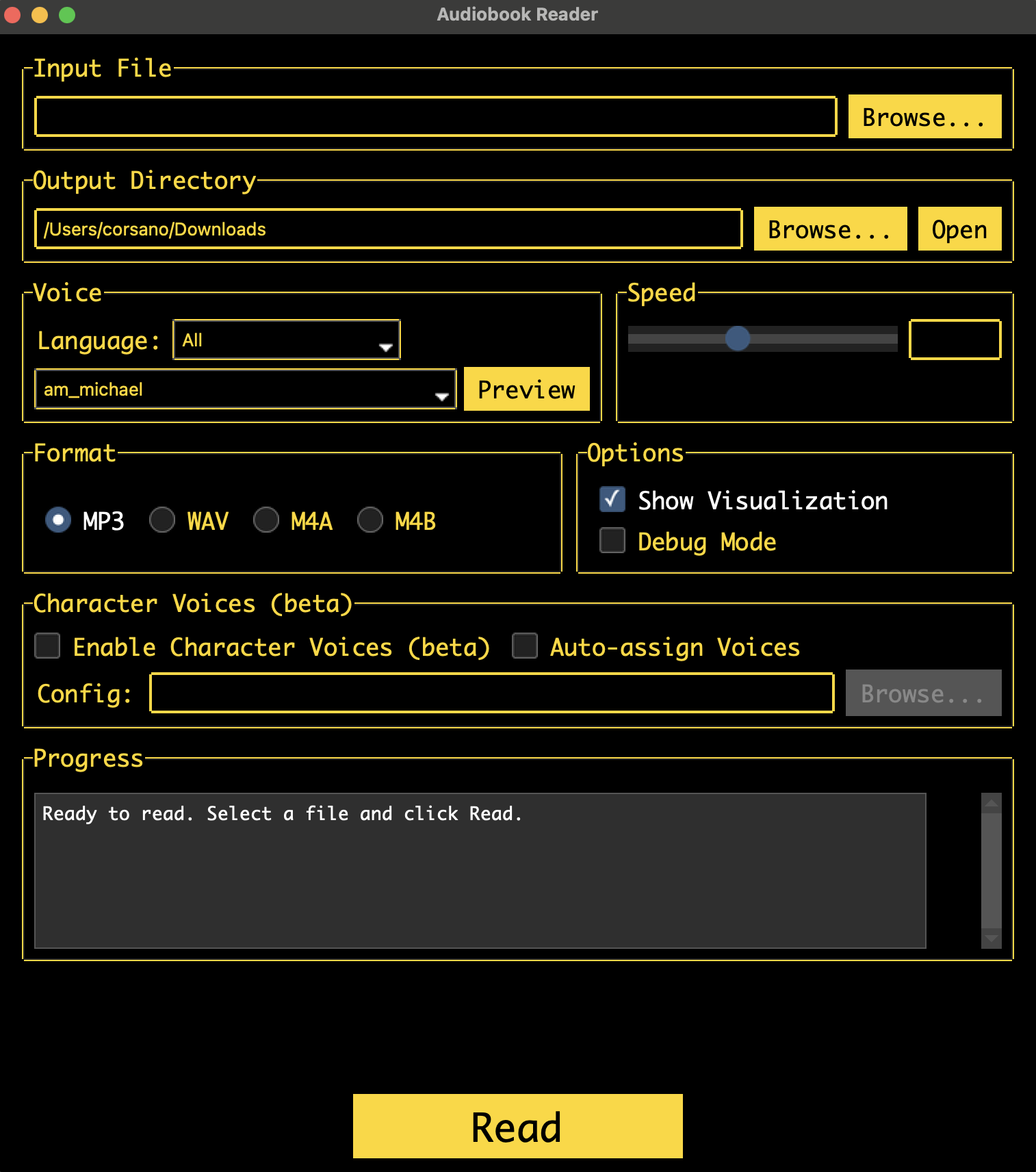
- Drag-and-drop interface: Select files visually, no terminal required
- 54 voices in 9 languages with real-time preview
- Voice blending: Mix voices via sliders with live playback
- Format support: EPUB, PDF, TXT, Markdown, RST → MP3, WAV, M4A, M4B
- Progress visualization: Visual progress bars with time estimates
- Character voices (beta): Assign voices to characters in plays and dialogues
- Hardware optimization: Automatic NPU/GPU/CPU detection for approximately 10x real-time speed
- Pause/resume: Interrupt and continue long conversions
- Batch queue: Add multiple books, process sequentially or in parallel
- FFmpeg integration: Download helper popup if not installed
Getting Started
First Launch
- Download the appropriate installer for your system
- macOS: Right-click and select “Open” (security prompt for unsigned app)
- Windows: Run installer or extract portable version
- Linux: Make AppImage executable (
chmod +x) or install package
First Conversion
- App will prompt to download Kokoro voice models (~310MB) and FFmpeg if needed
- Drag and drop a text file into the window
- Select output location and voice
- Click “Convert” - progress shows in real-time
Keyboard Shortcuts
- Ctrl/Cmd + O: Open file
- Ctrl/Cmd + S: Save output location
- Space: Pause/Resume conversion
- Ctrl/Cmd + Q: Quit app
- Ctrl/Cmd + ,: Open settings
Troubleshooting
macOS “App is damaged” error:
Run in Terminal: xattr -cr /Applications/AudiobookReader.app
Windows Defender warning: App is unsigned. Click “More info” → “Run anyway”
Linux permission issues:
Ensure AppImage is executable: chmod +x AudiobookReader.AppImage
Consider Supporting
I created this alone, and it will be free and open source forever. For issues and feature requests please use GitHub. If you find it useful, please consider supporting me so I can improve this tool and create more.
Copyright Notice
IMPORTANT: This software is a tool for converting text to audio. Users are solely responsible for:
- Ensuring they have the legal right to convert any text to audio
- Obtaining necessary permissions for copyrighted materials
- Complying with all applicable copyright laws and licensing terms
- Understanding that creating audiobooks from copyrighted text without authorization may constitute copyright infringement
Recommended Use Cases:
✅ Your own original content ✅ Public domain works ✅ Content you have explicit permission to convert ✅ Educational materials you legally own ✅ Open-source or Creative Commons licensed texts (per their terms)
I do not condone or support copyright infringement. By using this software, you agree to use it only for content you have the legal right to convert.